ReX: Causal Responsibility Explanations for image classifiers
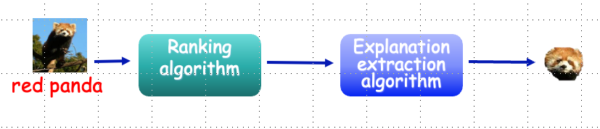
ReX is a causal explainability tool for image classifiers. ReX is black-box, that is, agnostic to the internal structure of the classifier. We assume that we can modify the inputs and send them to the classifier, observing the output. ReX provides sufficient, minimal single explanations, non-contiguous explanations (for partially obscured images), multiple explanations and contrastive explanations (sufficient, necessary and minimal).
For more information and links to the papers, see the background page.
Installation
Clone this repository and cd into it.
git clone git@github.com:ReX-XAI/ReX.git
cd ReX/
We recommend creating a virtual environment to install ReX.
ReX has been tested using versions of Python >= 3.10.
The following instructions assume conda:
conda create -n rex python=3.12
conda activate rex
pip install .
This should install an executable rex in your path.
Note:
By default,
onnxruntimewill be installed. If you wish to use a GPU, you should uninstallonnxruntimeand installonnxruntime-gpuinstead. You can alternatively edit thepyproject.tomlto read “onnxruntime-gpu >= 1.17.0” rather than “onnxruntime >= 1.17.0”.
Quickstart
ReX requires as input an image and a model. ReX natively understands onnx files. Train or download a model (e.g. Resnet50) and, from this directory, run:
rex tests/test_data/dog.jpg --model resnet50-v1-7.onnx -vv --output dog_exp.jpg
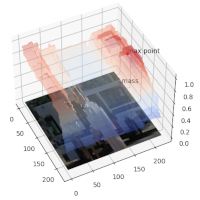
To view an interactive plot for the responsibility map, run::
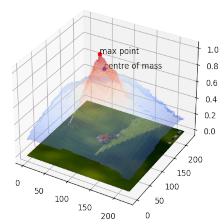
rex tests/test_data/dog.jpg --model resnet50-v1-7.onnx -vv --surface
To save the extracted explanation to a file:
rex tests/test_data/dog.jpg --model resnet50-v1-7.onnx --output dog_exp.jpg
ReX also works with PyTorch, but you will need to write some custom code to provide ReX with the prediction function and model shape, as well as preprocess the input data.
See the sample scripts in tests/scripts/.
rex tests/test_data/dog.jpg --script tests/scripts/pytorch_resnet50.py -vv --output dog_exp.jpg
Other options:
# with spatial search rather than the default global search
rex <path_to_image> --model <path_to_model> --strategy spatial

# to run multiple explanations
rex <path_to_image> --model <path_to_model> --multi

# to view a responsibility landscape heatmap
rex <path_to_image> --model <path_to_model>  --heatmap

# to save a responsibility landscape surface plot
rex <path_to_image> --model <path_to_model>  --surface <path_and_extension>
ReX configuration is mainly handled via a config file; some options can also be set on the command line.
ReX looks for the config file rex.toml in the current working directory and then $HOME/.config/rex.toml on unix-like systems.
If you want to use a custom location, use:
rex <path_to_image> --model <path_to_model> --config <path_to_config>
An example config file is included in the repo as example.rex.toml.
Rename this to rex.toml if you wish to use it.
Command line usage
                   @@@@@@@@@@@@@@@
                   @@  @@@@@@@@@@@
                 @@@@  @@@@@@@@@@@@@@@@@
                 @@@@@@@@@@@@@@@@@@@@@@@
                 @@@@@@@@@@@@@@@@@@@@@@@
                 @@@@@@@@@@
                 @@@@@@@@@@@@@@@@         %%%
@@ @@@@@@@@@@@ %%%%
@@ @@@@@@@ %%@ %%%% %%
@@ @@@@@@@@ @%%%%%%% %%%% %%
@@@@ @@@@@@@@@@ %%%% %%%%%% %%%% %%
@@@@@@ @@@@@@@@@@@@ %%%% %%%%%% % %%% %%
@@@@@@@@@@@@@@@@@@@@@@ %%%% % %% %%% %
@@@@@@@@@@@@@@@@@@@@ %%%% %% % %%%%
@@@@@@@@@@@@@@@@@@ %%% %% %%%%%%%%%%% %%%
@@@@@@@@@@@@@@@@ %%% %%%% %%%% % %%%
@@@@@@@@@@@@@@@ %%% %%%% %%%% %@ %%%
@@@@@@@@@@@@@ %%% %%%% %%% %% %%%
@@@@@@ @@@ %%% %%%% %%%% %% %%%%
@@@@ %%%% %%%%% %%%% %%%% %
@@ %%%% %%%% %%%%%@ %%%%%
@@@@ % %% % %%
Explaining AI through causal Responsibility EXplanations
usage: ReX [-h] [--output [OUTPUT]] [-c CONFIG] [--processed]
           [--script SCRIPT] [-v] [-q] [--surface [SURFACE]]
           [--heatmap [HEATMAP]] [--model MODEL] [--strategy STRATEGY]
           [--database DATABASE] [--multi [MULTI]]
           [--contrastive [CONTRASTIVE]] [--iters ITERS] [--analyze]
           [--analyse] [--mode MODE] [--spectral] [--version]
           filename
Positional Arguments
- filename
file to be processed, either an image, a numpy array, a mat file, or a nifti file
Named Arguments
- --output
show minimal, sufficient causal explanation, optionally saved to <OUTPUT>. Requires a PIL compatible file extension
- -c, --config
optional config file to use for ReX
- --processed
prevent ReX from performing any preprocessing
Default:
False- --script
custom loading and preprocessing script, mostly for use with pytorch models
- -v, --verbose
increase verbosity level, either -v or -vv
Default:
1- -q, --quiet
set verbosity level to 0 (errors only), overrides –verbose
Default:
False- --surface
surface plot of the responsibility map, optionally saved to <SURFACE>
- --heatmap
heatmap plot of the responsibility map, optionally saved to <HEATMAP>
- --model
model in .onnx format
- --strategy, -s
explanation strategy, one of < multi | spatial | global | spotlight >, defaults to global
- --database, -db
store output in sqlite database <DATABASE>, creating db if necessary. Please include the extension in the filename
- --multi
multiple explanations, with optional number <x> of spotlights, defaults to value in <rex.toml>, or 10 if undefined
- --contrastive
a contrastive explanation, minimal, necessary and sufficient. Needs optional number <x> of floodlights, defaults to value in <rex.toml>, or 10 if undefined
- --iters
manually override the number of iterations set in the config file
- --analyze
area, entropy and (possibly) insertion/deletion curves
Default:
False- --analyse
area, entropy and (possibly) insertion/deletion curves
Default:
False- --mode, -m
assist ReX with your input type, one of <tabular>, <spectral>, <RGB>, <voxel>, <audio>
- --spectral
set ReX input type to <spectral>, shortcut for –mode spectral
Default:
False- --version
show program’s version number and exit
Examples
Explanation
An explanation for a ladybird. This explanation was produced with 20 iterations, using the default masking colour (0). The minimal, sufficient explanation itself
is pretty printed using the settings in [rex.visual] in rex.toml.


Setting raw = true in rex.toml produces the image which was actually classified by the model.

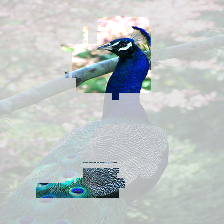
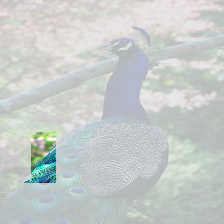
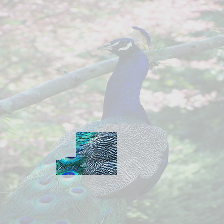
Multiple Explanations
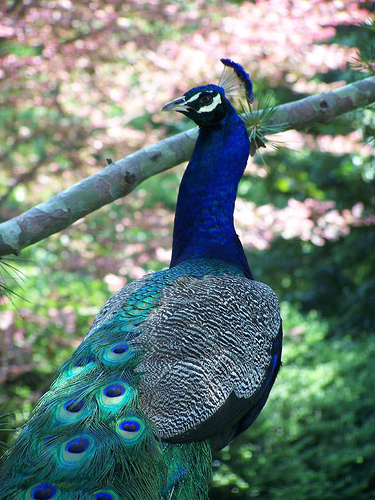
rex tests/test_data/peacock.jpg --model resnet50-v1-7.onnx --strategy multi --output peacock.png
The number of explanations found depends on the model and some of the settings in rex.toml.
Occluded Images


Explanation Quality
rex tests/test_data/ladybird.jpg --script tests/scripts/pytorch_resnet50.py --analyse

INFO:ReX:area 0.000399, entropy difference 6.751189, insertion curve 0.964960, deletion curve 0.046096