Multiple Explanations
This page describes multiple explanations, see Multiple Different Black Box Explanations for Image Classifiers.
Example
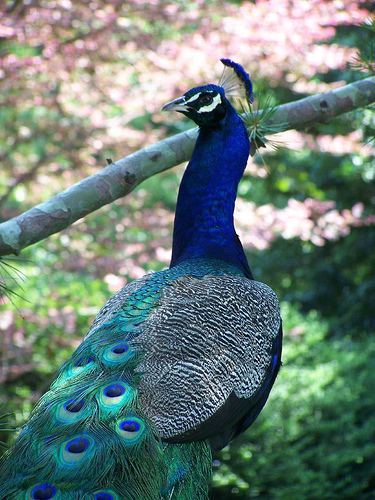
An image classification may have more than one sufficient explanation. Take this image of a peacock
The global explanation is:
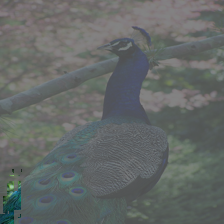
But it’s very likely that there’s more than one. This small part of the tail is enough to get the classification peacock, but there are many
other possible sources of information that match that classification. ReX can try to find them.
ReX searches the responsibility map for sufficient explanations. It does this by launched spotlights which explore the space, using the responsibility
as a guide. How many spotlights are launched is a parameter (by default: 10) and is set with the --multi flag; --multi takes an optional
integer argument.
ReX peacock.jpg --script ../tests/scripts/pytorch_resnet50.py --multi 5 -vv --output peacock_exp.png
we get
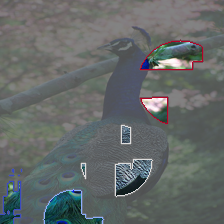
ReX has found 4 distinct, non-overlapping explanations. The original global explanation is still there, but we also have 3 other explanations. Two of these explanations (highlighted in white and red respectively) are disjoint explanations.
Overlap
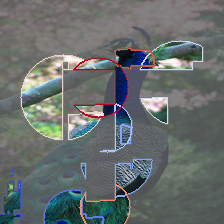
The peacock shows 4 non-overlapping explanations, but this is a parameter. We can set the allowed degree of overlap by changing
permitted_overlap in the config. This sets the dice coefficient
of the explanations.
If we set permitted_overlap = 0.5
ReX peacock.jpg --script ../tests/scripts/pytorch_resnet50.py --multi 10 -vv --output peacock_exp.png
Notes
Multi-ReX has many options and parameters, see config for the complete list.
The spotlight requires an objective function to guide its search of the responsibility landscape. By default this is none: if
the spotlight fails to find an explanation in one location, it takes a random jump to another. Alternatively, mean moves the spotlight
in the direction of the greater mean responsibility.
